
Loading
Loading
The Parkway Suite
Each app is the same platform shaped for one person on the care team. Same data underneath, a role-appropriate surface on top.
For support workers, on the go.
EVV clock-in, today’s shift at a glance, tasks and meds, and voice-to-note shift completion. Built for the phone in a worker’s pocket.
 App Store approved
For operators. Run the whole business.
Rostering, finance, compliance registers, clinical records, SCHADS payroll, invoicing and AI insights. The whole operation in one place.
 Coming to the App Store · use it in your browser today
For participants and families.
Their plan and goals, upcoming shifts, and the support team around them. A calm, clear window into their own support.
Open Connect Coming to the App Store · use it in your browser today
For Support Coordinators.
Magic-link access to the participant timeline, notes exported as PDF, and inline coordinator notes. No login needed, just a link.
Open CoordinatorParkways Connect
Schedule, goals, notes, funding status, and messages. Stills use demo names only (Jack Novak, PARCARE Demo). Not the office dashboard.
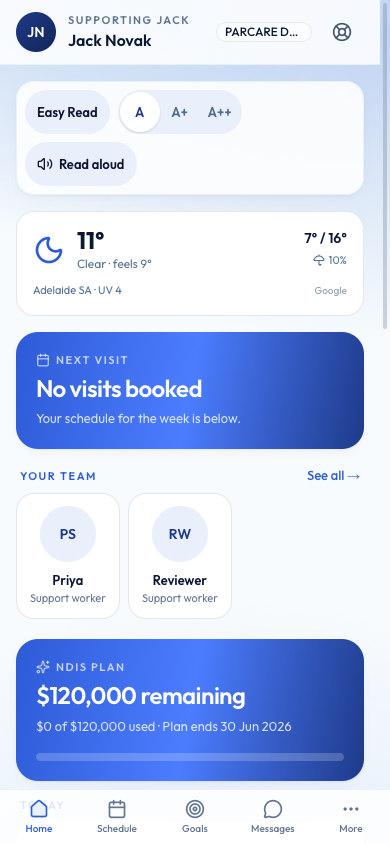
Home · demo names only
What it can do
Six things Parkway does on its own, each living in the app built for the person who needs it.
CoreEvery shift, who is on it, and what is still unfilled. The projected award cost, the margin and the penalty-rate shifts are all there while you build the week, not after the claim.
Scan with your phone camera, or search the App Store for “Parkways Worker”.

Parkways Workers for iPhone and Android
For support workers. Shifts, eMAR, notes, incidents.
Download on the App StoreAndroid: Get it on Google Play
Save this QR code to send on or print

All four apps, any phone
Every Parkway app works in any browser. Open it on your phone and add it to your home screen. It installs like a native app.
No app store neededSave this QR code, or just share the address: parkways.com.au/apps
Step-by-step install instructions are in the Parkway manual.
Same Parkway. Different surface for different people. Manual & docs · hello@parkways.com.au · Back to home
Not on Parkway yet? Pilot testing is underway. Join the pilot waitlist.
